
Fable: Track & Discuss Books
Scribd, Inc.Books & Reference
4.71.50K Reviews
- Version
- 0.282.22891
- Installs
- 1.00M
- Age Rating
- Everyone
Screenshots



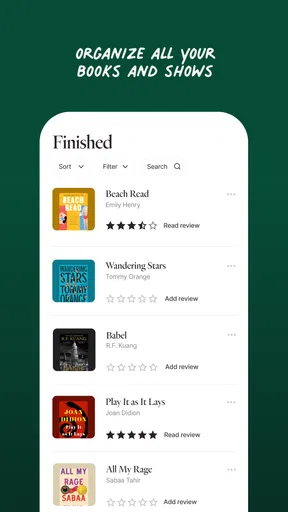


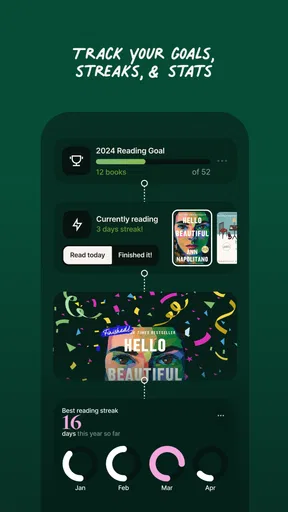
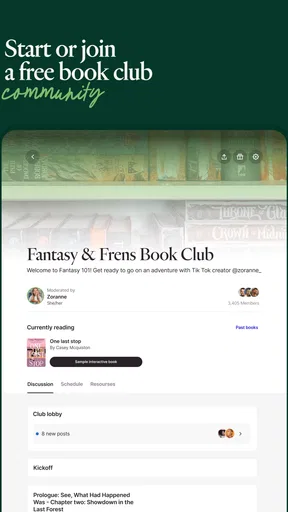
Our Review of Fable: Track & Discuss Books
 Analysis by Appyee
I approached Fable: Track & Discuss Books less like a simple reading tracker and more like a decision about how I want to read. The app sits in the Books & Reference category, but its appeal is not limited to recording titles. Its main idea is to make reading feel more social, more organized, and easier to continue when my attention is divided between several books.
That distinction matters. If you only want a private list of books you plan to read, a basic notes app may be enough. If you want a polished catalogue, a reading log, and a place to exchange thoughts with other readers, Fable is much more interesting. I found it most useful when I treated it as a reading routine rather than as a replacement for an ebook reader.
How I decided whether Fable was worth using
My first test was practical: could I understand what the app was for quickly, and could I keep using it without turning book tracking into another chore? Fable is free to install, has an Everyone content rating, and runs on Android from version 8.0 onward. That makes it easy to try on a wide range of devices, although in-app purchases range from $5.99 to $69.99 per item, so I would still check the purchase screens carefully before committing to anything.
The second test was whether the social side added real value. Many reading apps let me mark a book as finished, but that action can become a dead end. Fable is better suited to readers who want to react to books, follow conversations, and use other people’s responses as motivation. I did not see it as merely a shelf with decorative features; I saw it as a way to give reading a little structure and accountability.
The third test was privacy of attention, even without making assumptions about account settings or policies. Social reading can be energizing, but it can also pull me away from the book itself. I therefore judged the app by two questions: does it help me return to my reading, and can I use its community elements without letting them become the entire experience?
Those criteria make Fable easier to place beside its alternatives. A dedicated ebook app is usually better for opening a book and reading it. A notes app is faster for private observations. A spreadsheet gives more control over custom fields. Fable makes the strongest case when the missing piece is conversation: remembering what I read, finding people who care about similar books, and turning a solitary habit into something I can revisit.
The first session and the basic reading workflow
My first useful habit was to add books gradually instead of trying to build a perfect library in one sitting. That kept the app from feeling like an administrative project. I began with books I was actively reading, then added a few I genuinely intended to start soon. This is a small distinction, but it prevents a huge to-read list from becoming a guilt list.
Once a book is part of my reading life, the value comes from returning to it. I could use the app to keep my current reading interests in one place and to make my reactions more deliberate. Rather than relying on a vague memory that I “liked” something, I had a reason to record what stood out, what disappointed me, and whether I would recommend it to a particular kind of reader.
That workflow is especially helpful when I read in bursts. I might read several chapters on a weekend, stop for a week, and then forget why the book had caught my attention. A quick note or a look back at my activity gives me a bridge into the story again. It is not a substitute for bookmarks inside every reading app, but it helps preserve the larger context around the book.
One tip I found useful was to separate books I am curious about from books I am actually ready to read. Keeping those intentions distinct makes the app more honest. A title can remain interesting without demanding immediate attention, while my active list stays small enough to guide my next choice.
Why the social layer can be more than decoration
The strongest part of Fable is its attempt to connect books with discussion. Reading opinions from other people can reveal angles I missed, especially with novels that change meaning depending on a character, theme, or ending. It also gives me a practical way to decide whether a book suits my mood before spending hours with it.
I particularly like the idea of using conversation after reading rather than before it. Before starting a book, other readers’ enthusiasm can create expectations that the book may not meet. After finishing, discussion becomes more useful: I can compare my reaction with someone else’s without allowing their opinion to replace my own.
There is also a good use case for readers who struggle to finish books. Joining a discussion around a title can create a gentle deadline and a reason to keep going. That does not make every difficult book enjoyable, but it changes the experience from “I should read this someday” to “I have a specific point I want to reach.” For people who enjoy book clubs but do not have one nearby, this is probably the app’s clearest advantage.
My caution is that social reading works best with boundaries. I would not open the app every time I finish a page. I would read first, form an initial opinion, and only then browse discussion. Otherwise, the most visible reaction can become the opinion I carry into the next chapter. Fable is most valuable when it supports my reading rather than directing it.
Useful ways to build a personal reading system
I found three workflows more useful than simply collecting titles. The first is a “current, next, later” approach: keep only the books I am actively reading in the first group, choose a small number for the next group, and let everything else wait. This makes the app a decision tool instead of an endless catalogue.
The second is to use reactions as future recommendations to myself. After completing a book, I can think beyond “good” or “bad” and record who might enjoy it, what mood it suits, and what limitation could bother another reader. Months later, that kind of note is far more useful than a star-like impression with no explanation.
The third is to use the social side as a discovery filter, not as an authority. If several readers discuss a theme that interests me, I can investigate the title. But I still compare that enthusiasm with my own preferences: length, subject, tone, and whether I want something challenging or relaxing. This prevents the community from turning every popular recommendation into an obligation.
These workflows are not flashy features, but they are where the app became practical for me. The difference between a reading app I open once and one I keep is usually the quality of the habit it encourages.
Where Fable wins, and where another option may fit better
I’d judge Fable by whether its social side helps me return to books, rather than simply giving me another place to browse. In this section, I’ll weigh that recurring value against the quieter strengths of an ebook reader, private notes, or a simple list, so you can choose the tool that matches the way you actually read.
The best choice for readers who want accountability
Fable wins when reading is more enjoyable with other people involved. Its identity as a modern app for every reader is most convincing when I use it to connect personal tracking with discussion. Someone who enjoys book clubs, shared reactions, or discovering books through reader conversation will probably get more from it than someone who wants a silent database.
It also works well for a reader whose interests change often. Instead of asking me to commit to one genre or one long-term plan, the app can serve as a flexible record of what I am exploring. That is useful for students, casual readers, and anyone trying to rebuild a reading habit after a long break.
The developer is Scribd, Inc., and the app has a 4.7 average from around 28 thousand ratings. It has also passed one million installs, which suggests that the concept has found a substantial audience. I would not treat popularity as proof that it fits everyone, but it does make Fable feel like an established choice rather than an experiment with no community around it.
When a dedicated ebook reader is the better tool
If my priority is uninterrupted reading, I would choose the app designed around the book itself. A dedicated ebook reader generally keeps the page, text controls, bookmarks, and reading position at the center. Fable makes more sense alongside that tool than instead of it.
This distinction is important for anyone expecting to buy or read every book directly inside Fable. I would approach it primarily as a companion for organizing and discussing reading. If the only thing I want is to open a novel and read with as few distractions as possible, a focused reading application is likely the cleaner choice.
The same applies to academic reading. A student who needs detailed citations, extensive annotations, document management, or a strict research workflow may find a specialized reference tool more suitable. Fable can help organize reading interests, but it should not be mistaken for a full research system.
When private notes, spreadsheets, or a simple list are enough
A notes app remains better for completely private reactions. I can write without thinking about presentation, conversation, or how a note fits into a public reading identity. For a reader who only wants to remember a quote, a page number, or a personal idea, the faster tool may be the better tool.
A spreadsheet is stronger when I want unusual categories, custom sorting, or detailed statistics about my own reading. It takes more effort to maintain, but it gives me control that a purpose-built social reading app may not prioritize. Likewise, a basic list is ideal for someone who only needs a few reminders and dislikes managing another account or community space.
Fable’s trade-off is clear: it offers more context and interaction than a bare list, but that extra layer only pays off if I actually want it. Readers who dislike social feeds, recommendations, or discussion may experience the same richness as clutter.
The real cost of changing from another reading app
Switching is not only about installing a new app. The larger cost is rebuilding the reading system I already trust. If I have years of notes in a spreadsheet or carefully arranged shelves elsewhere, I would not move everything immediately. I would start with current books and the small group I expect to read soon.
That gradual approach also reveals whether Fable fits my habits before I invest time in a complete migration. I would use it for a few weeks, track active reading, and see whether the discussion layer changes my behavior in a positive way. If I keep opening it only to browse without reading, that is a sign the social side is working against my goal.
Another switching cost is learning what deserves to be recorded. A new app can tempt me to catalogue every title, reaction, and possibility. I found that a lighter system is more sustainable: save what I will use later, write reactions that have a clear purpose, and avoid treating the library as a performance.
Everyday scenario: choosing a book for a busy week
Imagine I have a long commute, limited evening energy, and three possible books waiting. One is intellectually demanding, one is familiar comfort reading, and one was recommended by a friend. Instead of choosing randomly, I can look at my reading activity, revisit what I previously enjoyed, and use reader discussion to understand the tone of the unfamiliar title.
I might choose the demanding book for the weekend, the comfort read for short weekday sessions, and leave the recommendation for later. After finishing a chapter, I can make a brief private observation before reading broader reactions. At the end of the week, the app has helped me make a realistic choice without pretending that every book belongs in the same reading schedule.
That is where I think Fable earns its place. It does not remove the need to choose, but it gives the choice more memory and context. For a busy reader, that can be more valuable than another enormous catalogue of titles.
What to know before paying for anything
The app itself is free, so I would begin there and judge the basic experience before considering an in-app purchase. The listed purchase range runs from $5.99 to $69.99 per item, which is broad enough that the exact screen and terms deserve attention before confirming payment. I would not subscribe simply because I enjoy the community; I would first identify the specific paid benefit I expect to use repeatedly.
This is also a good reason to avoid making a rushed decision during the first session. Give the free experience enough time to answer the important question: does Fable change how often I read or how thoughtfully I remember books? If the answer is no, a paid upgrade is unlikely to solve the underlying problem.
Performance expectations and device fit
Fable supports Android 8.0 and newer, so compatibility is relatively broad for Android users. The current version is 0.282.22891. I would still keep the app updated when possible, particularly because community-focused products depend on a smooth browsing and discussion experience.
On a smaller phone, I would use it in short sessions rather than trying to manage a huge reading library at once. The app’s value comes from returning to meaningful books and conversations, not from scrolling endlessly. On a larger screen, longer planning sessions may feel more comfortable, but my recommendation would remain the same: keep the active reading list deliberately small.
My recommendation for different kinds of readers
I recommend Fable to readers who want a social companion for books, enjoy exchanging interpretations, or need a little structure to finish what they start. It is especially appealing if ordinary reading lists feel lifeless and a traditional book club is difficult to join. The Everyone rating also makes it approachable for a broad audience, though individual discussion topics can still vary in suitability and interest.
I would skip it if I want a distraction-free ebook reader, a rigorous academic reference manager, or a completely private notebook. In those cases, a focused alternative is not merely cheaper or simpler; it is better aligned with the actual task.
My final view is positive, but conditional. Fable is not valuable because it records that I own or finished a book. It is valuable when that record leads me back to reading, helps me choose intelligently, or gives me a worthwhile conversation after I close the page. With a 4.7 average and around 1.5 thousand written reviews, it has clearly made a strong impression on many users, but my advice is still to test the habit rather than the headline.
My practical recommendation: install it, add only the books you are genuinely considering, and use the social features after forming your own reaction. If that small routine makes reading easier to continue, Fable is a strong fit. If it turns reading into another feed to monitor, return to a simpler list or a dedicated reader instead.
Verdict
Strengths of Fable: Track & Discuss Books
- Clean, reader-friendly interface makes tracking books quick and enjoyable.
- Discussion features help you connect with readers who share your interests.
- Personalized recommendations can help uncover books outside your usual choices.
- Useful progress tracking keeps current reads and reading goals organized.
- Book pages make it easy to discover reviews, ratings, and community opinions.
Limitations of Fable: Track & Discuss Books
- Some book editions or covers may be missing or incorrectly matched.
- Community activity can vary greatly depending on the title or genre.
- Advanced tracking and social features may require time to set up.
- Recommendations may feel repetitive if your reading history is limited.
- Some users may prefer a simpler app without social networking elements.
Other Releases by Scribd, Inc.
View All
Everand: Audiobooks & Ebooks
Books & Reference3.5

Scribd: 300M+ documents
Books & Reference3.4
Similar Picks in This Category
View All
Google Play Books & Audiobooks
Google LLC4.7

네이버 - NAVER
NAVER Corp.3.5

Wattpad - Read & Write Stories
Wattpad.com3.7

King James Bible - Verse+Audio
Ozion4.8

Bible Offline-KJV Holy Bible
Bíblia Offline4.9

Amazon Kindle: Reading App
Amazon Mobile LLC4.8
Frequently Asked Questions
What is Fable: Track & Discuss Books used for?
Fable is a social reading app designed to help you discover books, track your reading progress, and discuss titles with other readers. You can create a personal library, mark books as currently reading or finished, write reviews, rate titles, and join conversations or book clubs. It combines reading organization with a community experience for people who enjoy sharing recommendations and opinions.
Can I use Fable to join book clubs and discuss books with others?
Yes. Fable’s main appeal is its community-based discussion system. You can browse available book clubs, follow discussions, and participate in conversations about specific books or chapters. Some clubs may be public, while others can have their own membership rules or schedules. Before joining, check the club description and discussion format, especially if you prefer spoiler-free conversations or structured reading plans.
Does Fable let me read books directly inside the app?
Fable primarily focuses on tracking, discovering, and discussing books rather than replacing a dedicated ebook reader. Whether you can read a particular title in the app may depend on the book, available integrations, or the features offered at the time of use. In many cases, you may need to obtain the ebook, audiobook, or physical copy separately and then use Fable to organize your progress and participate in discussions.
Is Fable: Track & Discuss Books free to download?
Fable can generally be downloaded without an upfront charge, but some features, clubs, or content may be subject to optional purchases or subscription plans. Availability and pricing can vary by platform, region, and changes made by the developer. It is worth reviewing the App Store or Google Play listing, as well as the in-app subscription screen, before confirming any payment or starting a free trial.
What privacy and account information does Fable require?
To use Fable’s social features, you may need to create an account and provide basic information such as an email address, username, or profile details. Your reading activity, ratings, reviews, club memberships, and discussions may be visible to other users depending on your profile and privacy settings. Before posting, review the available controls and the app’s privacy policy, particularly if you want to keep your reading habits or personal information private.
